Navigating the world of Apple’s iPads can feel a bit like deciphering a secret code. With a constantly evolving lineup, new features, and generations piling up, understanding iPad model series and generations is essential whether you're buying your first tablet, upgrading, or simply trying to figure out if your current device supports the latest accessories. Don't worry; we're cutting through the complexity to give you a clear, comprehensive guide that’s actually useful.
From its debut in 2010, the iPad has transformed from a simple content consumption device into a powerful tool for creativity, productivity, and everything in between. But which iPad is right for you? The answer lies in grasping the nuances between its core series – the standard iPad, iPad mini, iPad Air, and iPad Pro – and the generational advancements that define each one.
At a Glance: Your iPad Decoding Cheat Sheet
- Four Main Series: Standard iPad (entry-level), iPad mini (portable powerhouse), iPad Air (mid-range balance), iPad Pro (professional-grade performance).
- Generations Matter: Each new generation brings significant upgrades in chips, display technology, camera capabilities, and accessory compatibility.
- Apple Silicon: iPads have moved from A-series to desktop-class M-series chips, offering unprecedented performance.
- Accessory Ecosystem: Apple Pencil and Smart/Magic Keyboards have specific compatibility with different iPad models and generations.
- Future-Proofing: Newer generations generally receive longer software support and are compatible with the latest apps and features.
- Identify Your Model: Knowing your iPad's exact generation is crucial for everything from buying accessories to understanding its capabilities.
The Evolving iPad Landscape: A Brief History
When Apple unveiled the original iPad in 2010, it effectively carved out a new category between smartphones and laptops. It was a simple device, but its potential was undeniable. Since then, the iPad has undergone a remarkable transformation, adapting to technological advancements and user demands for everything from immersive entertainment and collaborative education to robust business applications.
What started as a single product has blossomed into a diverse family, each member designed with a particular user in mind. Understanding this lineage is key to appreciating why certain features appeared when they did, and how they contribute to the iPad’s current capabilities.
Understanding the iPad Family Tree: Series Explained
Apple's iPad lineup is structured into four distinct series, each catering to different needs, budgets, and performance expectations. Think of them as different branches of the same family, each with its own strengths and personality.
The Standard iPad: Your Everyday Companion
The "iPad" – without any extra monikers – is Apple's most accessible tablet. It's the workhorse of the lineup, designed for students, casual users, and anyone who needs reliable performance without breaking the bank.
- Who it's for: Web browsing, email, streaming video, light gaming, basic note-taking, and educational apps.
- Key Traits: Offers solid performance, good battery life, and remains the most affordable entry point into the iPad ecosystem. Its display has grown from the original 9.7-inch to a more modern 10.2-inch, then to a 10.9-inch Liquid Retina display.
- Evolution Highlights:
- iPad 1st Gen (2010): The pioneer.
- iPad 5th Gen (2017): Relaunched as a more budget-friendly option, bringing back an A9 chip.
- iPad 6th Gen (2018): Became the first entry-level iPad to support the Apple Pencil (1st Gen), a huge step for students and note-takers.
- iPad 7th Gen (2019): Introduced a larger 10.2-inch display and the Smart Connector for Apple's Smart Keyboard.
- iPad 10th Gen (2022): Received a significant redesign, adopting the modern, edge-to-edge Liquid Retina display, USB-C, and moving the front camera to a landscape orientation – perfect for video calls. It also runs on the A14 Bionic chip.
- iPad 11th Gen (2025): Expected to feature the A16 Bionic chip and increased base storage, continuing its role as a strong budget choice.
iPad mini: Power in Your Pocket
Don't let the name fool you; the iPad mini punches well above its weight class. This compact device packs high-end performance into a portable 8-inch (or 8.3-inch) frame, making it ideal for on-the-go productivity, reading, and immersive entertainment.
- Who it's for: Frequent travelers, avid readers, mobile gamers, and those who prefer a highly portable tablet for note-taking and quick tasks.
- Key Traits: Exceptionally portable, often features a powerful A-series Bionic chip (comparable to higher-end iPhones), and boasts a sharp Retina or Liquid Retina display.
- Evolution Highlights:
- iPad mini 1st Gen (2012): Introduced the 7.9-inch form factor, instantly appealing to those seeking more portability.
- iPad mini 2 (2013): Gained a Retina display and the powerful A7 chip, matching the iPad Air's performance.
- iPad mini 4 (2015): A significant redesign, making it thinner and lighter with a laminated display.
- iPad mini 6th Gen (2021): A complete overhaul, mirroring the Air/Pro design with an 8.3-inch edge-to-edge Liquid Retina display, Touch ID in the top button, USB-C, 5G, and support for the Apple Pencil (2nd Gen). It was powered by the A15 Bionic chip.
- iPad mini 7th Gen (2024): Set to upgrade to the A17 Pro chip and integrate Apple Intelligence features, solidifying its place as a portable powerhouse.
iPad Air: The Sweet Spot of Performance and Portability
The iPad Air bridges the gap between the standard iPad and the professional-grade iPad Pro. It's designed for users who need more power and advanced features than the basic iPad offers, but don't necessarily require all the bells and whistles (or the higher price tag) of the Pro models.
- Who it's for: Creatives, students, light professionals, and anyone who wants a powerful, versatile tablet for tasks like graphic design, photo editing, and demanding apps, balanced with a sleek, lightweight design.
- Key Traits: Features powerful chips (now M-series), a slim design, Liquid Retina displays, and support for advanced accessories.
- Evolution Highlights:
- iPad Air 1st Gen (2013): Emphasized lightness and thinness, introducing the 64-bit A7 chip to the iPad line.
- iPad Air 4th Gen (2020): Adopted the modern edge-to-edge Liquid Retina display design, moved Touch ID to the top button, switched to USB-C, and gained the A14 Bionic chip with Apple Pencil (2nd Gen) support. This was a pivotal moment for the series.
- iPad Air 5th Gen (2022): Integrated the M1 chip, bringing desktop-class performance to the Air for the first time, alongside 5G and the Center Stage front camera.
- iPad Air 6th Gen (2024): Introduced a new 13-inch size option alongside the 11-inch model, powered by the M2 chip, and featured a landscape front camera.
- iPad Air 7th Gen (2025): Expected to include the M3 chip and integrate Apple Intelligence tools, pushing its capabilities even further.
iPad Pro: The Pinnacle of Tablet Technology
The iPad Pro represents the ultimate expression of Apple's tablet vision. It’s built for professionals and power users who demand uncompromising performance, the most advanced display technology, and full compatibility with Apple's cutting-edge accessories.
- Who it's for: Graphic designers, video editors, photographers, digital artists, architects, and anyone who needs a tablet capable of running demanding professional software with desktop-class performance.
- Key Traits: Features desktop-class M-series chips, stunning ProMotion Liquid Retina XDR (mini-LED) or Ultra Retina XDR (OLED) displays, advanced camera systems with LiDAR, Face ID, and Thunderbolt/USB 4 connectivity.
- Evolution Highlights:
- iPad Pro 1st Gen (2015): Launched with a large 12.9-inch display and introduced support for the Apple Pencil (1st Gen) and Smart Keyboard – a clear signal of its professional ambitions. A 9.7-inch version followed in 2016.
- iPad Pro 3rd Gen (2018): A radical redesign brought edge-to-edge Liquid Retina displays, Face ID (replacing Touch ID), and a shift to a USB-C port, along with the A12X Bionic chip and magnetic Apple Pencil (2nd Gen) support. This model truly defined the modern iPad Pro.
- iPad Pro 5th Gen (2021): Made headlines with the integration of the M1 chip, delivering unprecedented desktop-class performance, 5G connectivity, and the incredible Liquid Retina XDR (mini-LED) display on the 12.9-inch model.
- iPad Pro 7th Gen (2024): Debuted the revolutionary M4 chip (Apple's first 3nm chip), an Ultra Retina XDR OLED display, and support for the Apple Pencil Pro, cementing its position as a powerhouse.
Decoding iPad Features & Innovations Over Time
Beyond the series names, understanding the evolution of key technologies is vital. Each generation often brings significant leaps in these areas, impacting everything from app performance to visual fidelity.
Displays: A Feast for Your Eyes
The iPad's display has been at the forefront of its innovation. From the original 9.7-inch LED-backlit display (1024 x 768) of the 1st Gen, we've seen a rapid progression:
- Retina Display (iPad 3rd Gen, 2012): Quadrupled pixels to 2048 x 1536, making individual pixels indistinguishable to the naked eye – a game-changer for clarity.
- P3 Wide Color & True Tone (iPad Pro 1st Gen, 2015): Introduced wider color gamuts for more vibrant, accurate colors, and True Tone for adaptive white balance based on ambient light.
- ProMotion Technology (iPad Pro 2nd Gen, 2017): Brought 120Hz adaptive refresh rates for incredibly smooth scrolling, fluid motion, and highly responsive Apple Pencil input.
- Liquid Retina Display (iPad Pro 3rd Gen, 2018): Introduced edge-to-edge LCD screens with rounded corners, a hallmark of the modern iPad design, later adopted by the Air and mini.
- Liquid Retina XDR (mini-LED) (iPad Pro 5th Gen, 2021): The 12.9-inch Pro adopted mini-LED technology, offering incredible brightness, contrast, and true-to-life HDR content.
- Ultra Retina XDR (OLED) (iPad Pro 7th Gen, 2024): The ultimate display leap to tandem OLED technology, providing perfect blacks, even higher peak brightness, and unparalleled contrast for a truly cinematic experience.
Chips & Processing Power: From A to M
The heart of every iPad is its chip, and this is where some of the most dramatic advancements have occurred.
- A-series Chips: Starting with Apple's custom A4 chip in the original iPad, these processors rapidly evolved. A-series Bionic chips (like the A12, A13, A14, A15, A16, A17 Pro) incorporate Neural Engines for advanced machine learning, powering features like Siri, Face ID, and advanced photo processing. These chips continue to offer robust performance for the standard iPad and iPad mini.
- M-series Chips (M1, M2, M3, M4): Introduced with the iPad Pro 5th Gen (2021), these are Apple's desktop-class chips, also found in Macs. They deliver a monumental leap in performance, offering multi-core processing, powerful integrated GPUs, and advanced unified memory architecture, enabling iPads to handle tasks traditionally reserved for high-end laptops, like 4K video editing, complex 3D rendering, and professional music production.
Connectivity & Ports: Adapting to Modern Demands
The physical connection points on your iPad have changed significantly, impacting charging, data transfer, and accessory options.
- 30-pin Connector: The original large connector used in early iPads (up to iPad 4th Gen and iPad mini 1st Gen).
- Lightning Connector: Introduced with the iPad 4th Gen (2012), this smaller, reversible connector became standard for years across the standard iPad, mini, and older Air models.
- USB-C (Thunderbolt/USB 4): A major shift started with the iPad Pro 3rd Gen (2018), then the iPad Air 4th Gen (2020), iPad mini 6th Gen (2021), and standard iPad 10th Gen (2022). USB-C offers faster data transfer, charging, and broader compatibility with external drives, monitors, and other peripherals. On iPad Pro models, this port often supports Thunderbolt/USB 4, providing even faster speeds and expanded capabilities.
Biometrics: Secure and Convenient Access
How you unlock and authenticate on your iPad has also evolved:
- Touch ID: Introduced with the iPad Air 2 (2014), this fingerprint sensor was initially integrated into the Home button. Newer iPad Air and iPad mini models, as well as the iPad 10th Gen, have moved Touch ID to the top power button, allowing for edge-to-edge displays.
- Face ID: The iPad Pro 3rd Gen (2018) ushered in Face ID, using a TrueDepth camera system for secure facial recognition, eliminating the Home button entirely and enabling the sleek, all-screen design.
Accessories: Unleashing iPad's Potential
The iPad's utility is often amplified by its sophisticated accessory ecosystem.
- Apple Pencil: This stylus is arguably the most transformative iPad accessory.
- Apple Pencil (1st Gen): Launched with the iPad Pro 1st Gen (2015), it's compatible with many standard iPads (6th-9th Gen), older iPad Air (3rd Gen), and older iPad mini (5th Gen). It charges via Lightning port or an adapter.
- Apple Pencil (2nd Gen): Introduced with the iPad Pro 3rd Gen (2018), it magnetically attaches to the side of compatible iPads (Pro 3rd Gen & later, Air 4th Gen & later, mini 6th Gen) for charging and pairing. It also supports double-tap gestures.
- Apple Pencil (USB-C): Released in 2023, this more affordable option connects via USB-C for charging and pairing, but lacks pressure sensitivity and magnetic charging. It works with most iPads that have a USB-C port.
- Apple Pencil Pro: Debuted with the iPad Pro 7th Gen (2024), this new flagship pencil adds features like squeeze gestures, barrel roll, and haptic feedback, offering even more precise control for creative professionals.
- Keyboards:
- Smart Keyboard: Utilizes the Smart Connector for power and data, offering a physical keyboard without requiring Bluetooth pairing or charging.
- Magic Keyboard: Introduced with the iPad Pro 4th Gen (2020), this premium accessory features a backlit keyboard, a trackpad, and a floating cantilever design, transforming the iPad into a highly capable laptop alternative. It uses USB-C passthrough charging.
- Magic Keyboard Folio: A two-piece design for the iPad 10th Gen, offering a detachable keyboard and stand.
Pinpointing Your iPad's Generation: Why It Matters
Knowing your iPad's exact model and generation is crucial for several reasons:
- Accessory Compatibility: As you've seen, Apple Pencils and keyboards have specific compatibility. A 1st Gen Pencil won't work with an iPad designed for a 2nd Gen Pencil, and vice-versa.
- Software Updates: Older iPads eventually stop receiving the latest iPadOS updates, impacting security and access to new app features.
- Performance Expectations: An iPad with an older A-series chip will perform differently than one with a newer M-series chip, especially with demanding apps.
- Resale Value: Knowing the generation helps accurately price your device for resale or trade-in.
- Troubleshooting & Repairs: Identifying the correct model ensures you get the right parts or technical support.
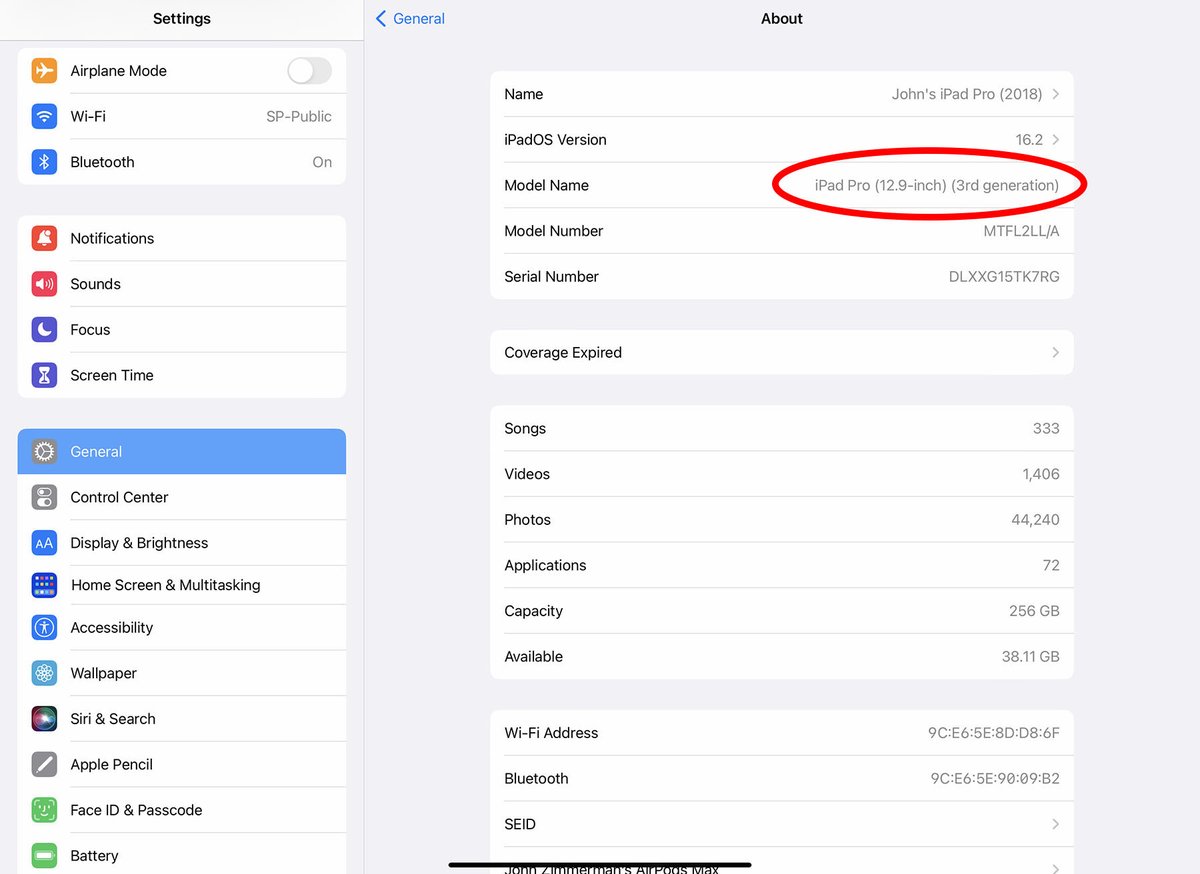
Fortunately, finding your iPad's generation is straightforward. You can easily discover this critical information through your device's settings. For a step-by-step guide on how to locate this, you’ll want to check out how to find your iPad generation.
Making the Right Choice: Which iPad is for You?
With so many models and generations, choosing the right iPad can feel overwhelming. Here’s a framework to help you make an informed decision:
1. Define Your Primary Use Case
- Casual Browsing & Entertainment: If you mostly stream videos, browse the web, read ebooks, and manage email, a standard iPad (9th or 10th Gen) offers excellent value. It's affordable and robust enough for these everyday tasks.
- Portability & Reading: For a device you can easily slip into a small bag, perfect for reading on commutes, light note-taking, or gaming on the go, the iPad mini (6th or 7th Gen) is unparalleled. Its compact size doesn't compromise on power.
- Creative Tasks & Productivity (Mid-Range): If you dabble in photo editing, light graphic design, extensive note-taking, or want a more laptop-like experience with a Magic Keyboard, the iPad Air (5th or 6th Gen) strikes a fantastic balance. Its M-series chip makes it highly capable without the Pro price tag.
- Professional Work & Demanding Tasks: For heavy video editing, 3D rendering, professional illustration, or if you need the absolute best display and performance available in a tablet, the iPad Pro (6th or 7th Gen) is your best bet. It's built to handle anything you throw at it.
2. Consider Your Budget
Naturally, price plays a significant role.
- Budget-Conscious: The standard iPad (especially previous generations like the 9th Gen if still available new or refurbished) is the most economical.
- Mid-Range: The iPad mini and iPad Air fall into this category, offering a step up in features and performance for a proportional increase in cost.
- Premium: The iPad Pro is Apple's most expensive tablet, but its capabilities justify the investment for professionals.
3. Think About Longevity and Future-Proofing
Apple typically supports its iPads with iPadOS updates for many years. Generally, newer models with more powerful chips will receive updates for longer. If you plan to keep your iPad for 3-5+ years, investing in a newer generation (like an M-series iPad Air or Pro) will ensure it remains capable and secure for a longer period.
4. Don't Forget Accessories
Factor in the cost and necessity of accessories like the Apple Pencil and a keyboard. For instance, if you absolutely need the advanced features of the Apple Pencil Pro, you'll need one of the latest iPad Pro models. If a more basic stylus experience is fine, a 1st Gen Apple Pencil with a standard iPad might suffice. Be sure to check which Apple Pencil is compatible with your chosen iPad generation to avoid disappointment. Learn more about their differences and how to pick the right one by exploring Apple Pencil Generation 1 vs 2 vs USB-C vs Pro.
5. Storage Needs
Modern iPads come with various storage options, typically starting from 64GB or 128GB and going up to 2TB for Pro models. Consider how many apps, photos, videos, and documents you plan to store locally. It's always better to slightly overestimate your needs, as iPad storage isn't expandable.
Pitfalls to Avoid When Buying an iPad
- Buying Too Old: While an older iPad might be cheap, it could quickly become obsolete for new apps, lack current security updates, and not support newer accessories.
- Overspending on Features You Won't Use: Don't buy an iPad Pro if you only need it for Netflix. Match the power to your actual workload.
- Ignoring Accessory Compatibility: Always double-check which Apple Pencil, Smart Keyboard, or Magic Keyboard is compatible with the specific generation of iPad you're considering.
- Neglecting Storage: Running out of storage can be a frustrating and costly mistake, forcing you to rely on cloud services or constantly offload content.
- Not Considering Cellular: If you frequently need internet access away from Wi-Fi, the Wi-Fi + Cellular model offers convenience but comes at a higher price and requires a data plan.
- Not checking for refurbished options: Apple's certified refurbished store offers great deals on recent models with a full warranty, a fantastic way to save money without sacrificing quality. For those interested in exploring sustainable tech options, delving into best refurbished tech products from Apple can reveal significant savings.
The Future of iPad: What's Next?
Apple's commitment to the iPad is unwavering. Looking ahead, we can anticipate continued innovation across several fronts:
- Deeper AI Integration: With the introduction of Apple Intelligence, expect iPads to become even smarter, assisting with everything from creative tasks to organizing your life, similar to what you might find in how to use Apple Intelligence on iPhone.
- Wider OLED Adoption: The stunning Ultra Retina XDR OLED display, currently exclusive to the iPad Pro, is likely to trickle down to iPad Air and potentially even the mini in future generations.
- Enhanced Performance: The M-series chips will continue to push the boundaries of what a tablet can do, blurring the lines further between tablets and traditional computers.
- New Form Factors: While speculative, discussions around foldable iPads or even iPad/MacBook hybrids with massive screens continue to surface, suggesting Apple might explore entirely new ways to interact with its tablets by 2028.
- Improved Battery Life: Apple is always striving for better efficiency, so continued improvements in battery performance are a safe bet.
Wrapping Up: Empowering Your iPad Decision
The iPad has come a long way since 2010. Understanding its model series – the standard, mini, Air, and Pro – and the generational advancements within each category empowers you to make a truly informed purchase. Whether you're a student, a creative professional, or someone who simply wants a great device for everyday tasks, there's an iPad designed specifically for your needs.
By considering your budget, primary use cases, and how long you expect to keep the device, you can confidently choose an iPad that will not only meet your current demands but also serve you well into the future. It’s not just about owning a tablet; it’s about choosing the right digital companion for your life.